备注
Go to the end to download the full example code
TransE-FB15K-single-gpu || TransE-FB15K-single-gpu-wandb || TransE-FB15K-single-gpu-hpo || TransE-FB15K-multigpu || TransE-FB15K-multigpu-wandb || TransE-FB15K237-single-gpu-wandb || TransE-WN18RR-single-gpu-adv-wandb
TransE-FB15K-single-gpu-wandb
这一部分介绍如何用一个 GPU 在 FB15k 知识图谱上训练 TransE [BUGD+13],使用 wandb 记录实验结果。
导入数据
pybind11-OpenKE 有两个工具用于导入数据: pybind11_ke.data.TrainDataLoader 和
pybind11_ke.data.TestDataLoader。
from pybind11_ke.utils import WandbLogger
from pybind11_ke.config import Trainer, Tester
from pybind11_ke.module.model import TransE
from pybind11_ke.module.loss import MarginLoss
from pybind11_ke.module.strategy import NegativeSampling
from pybind11_ke.data import TrainDataLoader, TestDataLoader
首先初始化 pybind11_ke.utils.WandbLogger 日志记录器,它是对 wandb 初始化操作的一层简单封装。
wandb_logger = WandbLogger(
    project="pybind11-ke",
    name="transe",
    config=dict(
            in_path = "../../benchmarks/FB15K/",
            nbatches = 200,
            threads = 8,
            sampling_mode = "normal",
            bern = True,
            neg_ent = 25,
            neg_rel = 0,
            dim = 50,
            p_norm = 1,
            norm_flag = True,
            margin = 1.0,
            use_gpu = True,
            device = 'cuda:1',
            epochs = 1000,
            lr = 0.01,
            test = True,
            valid_interval = 100,
            log_interval = 100,
            save_interval = 100,
            save_path = '../../checkpoint/transe.pth'
    )
)

config = wandb_logger.config
pybind11-KE 提供了很多数据集,它们很多都是 KGE 原论文发表时附带的数据集。
pybind11_ke.data.TrainDataLoader 包含 in_path 用于传递数据集目录。
# dataloader for training
train_dataloader = TrainDataLoader(
    in_path = config.in_path,
    nbatches = config.nbatches,
    threads = config.threads,
    sampling_mode = config.sampling_mode,
    bern = config.bern,
    neg_ent = config.neg_ent,
    neg_rel = config.neg_rel)
导入模型
pybind11-OpenKE 提供了很多 KGE 模型,它们都是目前最常用的基线模型。我们下面将要导入
pybind11_ke.module.model.TransE,它是最简单的平移模型。
# define the model
transe = TransE(
    ent_tol = train_dataloader.get_ent_tol(),
    rel_tol = train_dataloader.get_rel_tol(),
    dim = config.dim,
    p_norm = config.p_norm,
    norm_flag = config.norm_flag)
损失函数
我们这里使用了 TransE [BUGD+13] 原论文使用的损失函数:pybind11_ke.module.loss.MarginLoss,
pybind11_ke.module.strategy.NegativeSampling 对
pybind11_ke.module.loss.MarginLoss 进行了封装,加入权重衰减等额外项。
# define the loss function
model = NegativeSampling(
    model = transe,
    loss = MarginLoss(margin = config.margin),
    batch_size = train_dataloader.get_batch_size()
)
训练模型
pybind11-OpenKE 将训练循环包装成了 pybind11_ke.config.Trainer,
可以运行它的 pybind11_ke.config.Trainer.run() 函数进行模型学习;
也可以通过传入 pybind11_ke.config.Tester,
使得训练器能够在训练过程中评估模型;pybind11_ke.config.Tester 使用
pybind11_ke.data.TestDataLoader 作为数据采样器。
# dataloader for test
test_dataloader = TestDataLoader('../../benchmarks/FB15K/')

# test the model
tester = Tester(model = transe, data_loader = test_dataloader, use_gpu = config.use_gpu, device = config.device)

# train the model
trainer = Trainer(model = model, data_loader = train_dataloader,
    epochs = config.epochs, lr = config.lr, use_gpu = config.use_gpu, device = config.device,
    tester = tester, test = config.test, valid_interval = config.valid_interval,
    log_interval = config.log_interval, save_interval = config.save_interval,
    save_path = config.save_path, use_wandb = True)
trainer.run()

# close your wandb run
wandb_logger.finish()
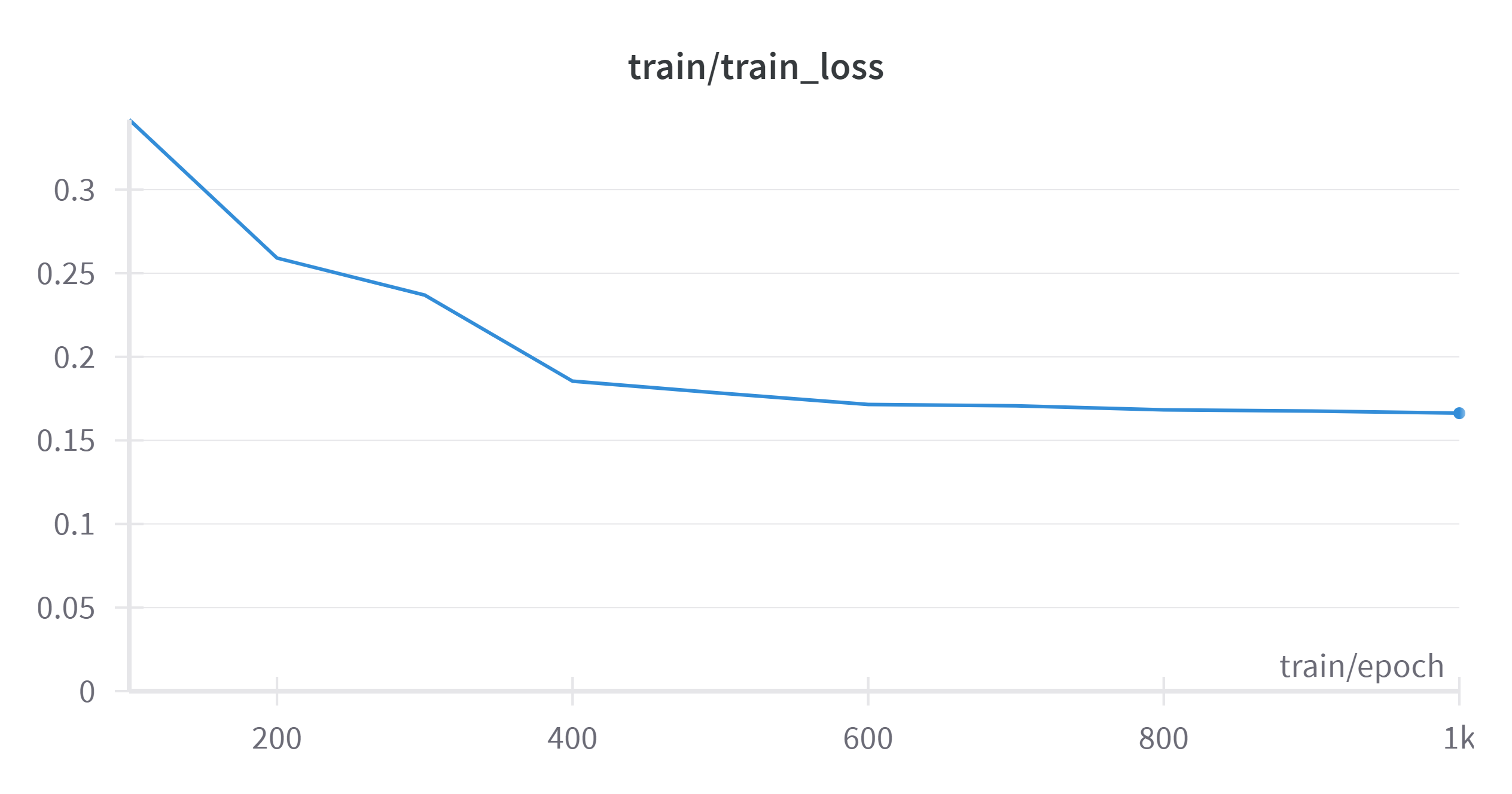
训练过程中损失值的变化
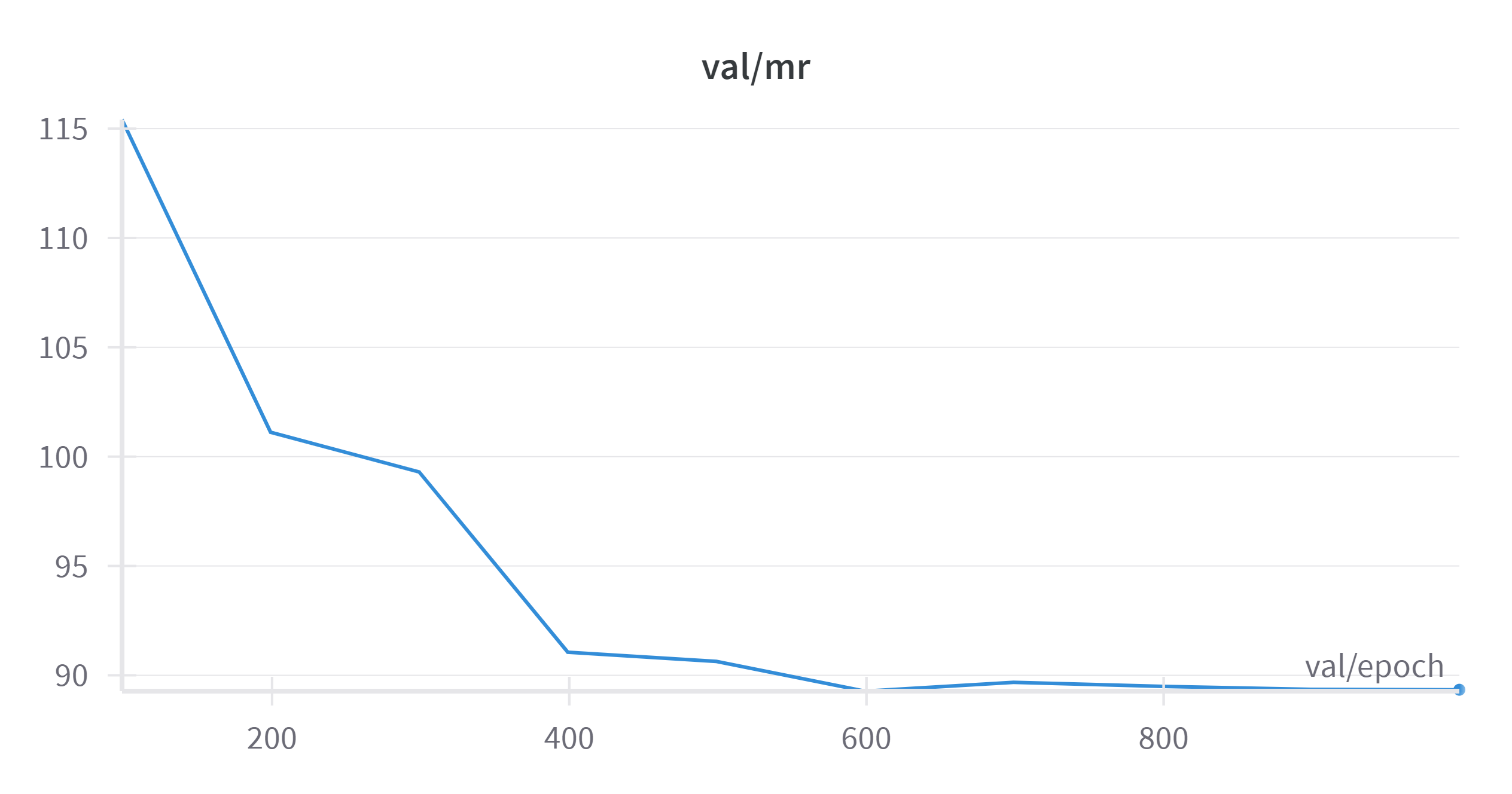
训练过程中 MR 的变化
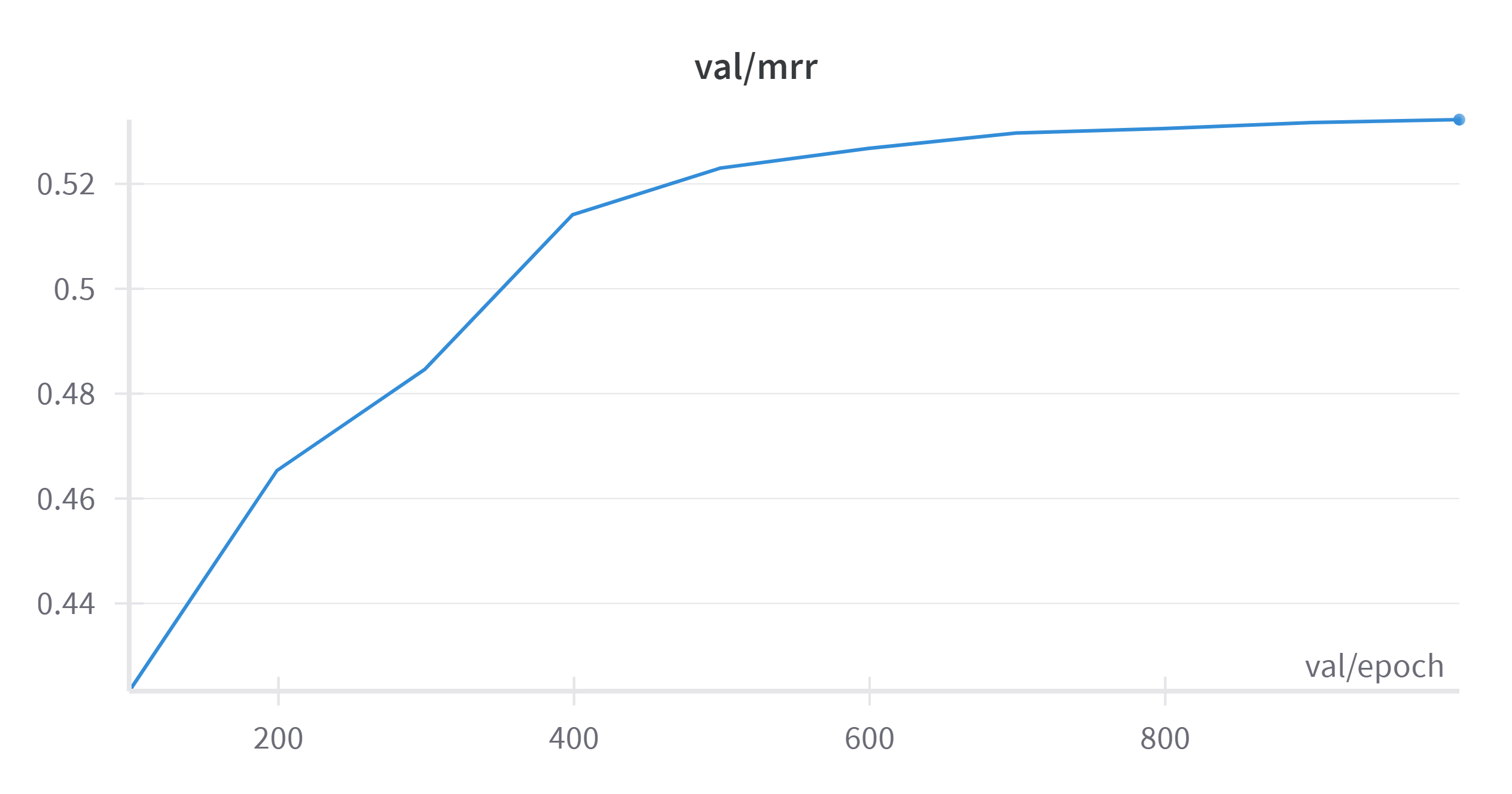
训练过程中 MRR 的变化
Total running time of the script: ( 0 minutes 0.000 seconds)